


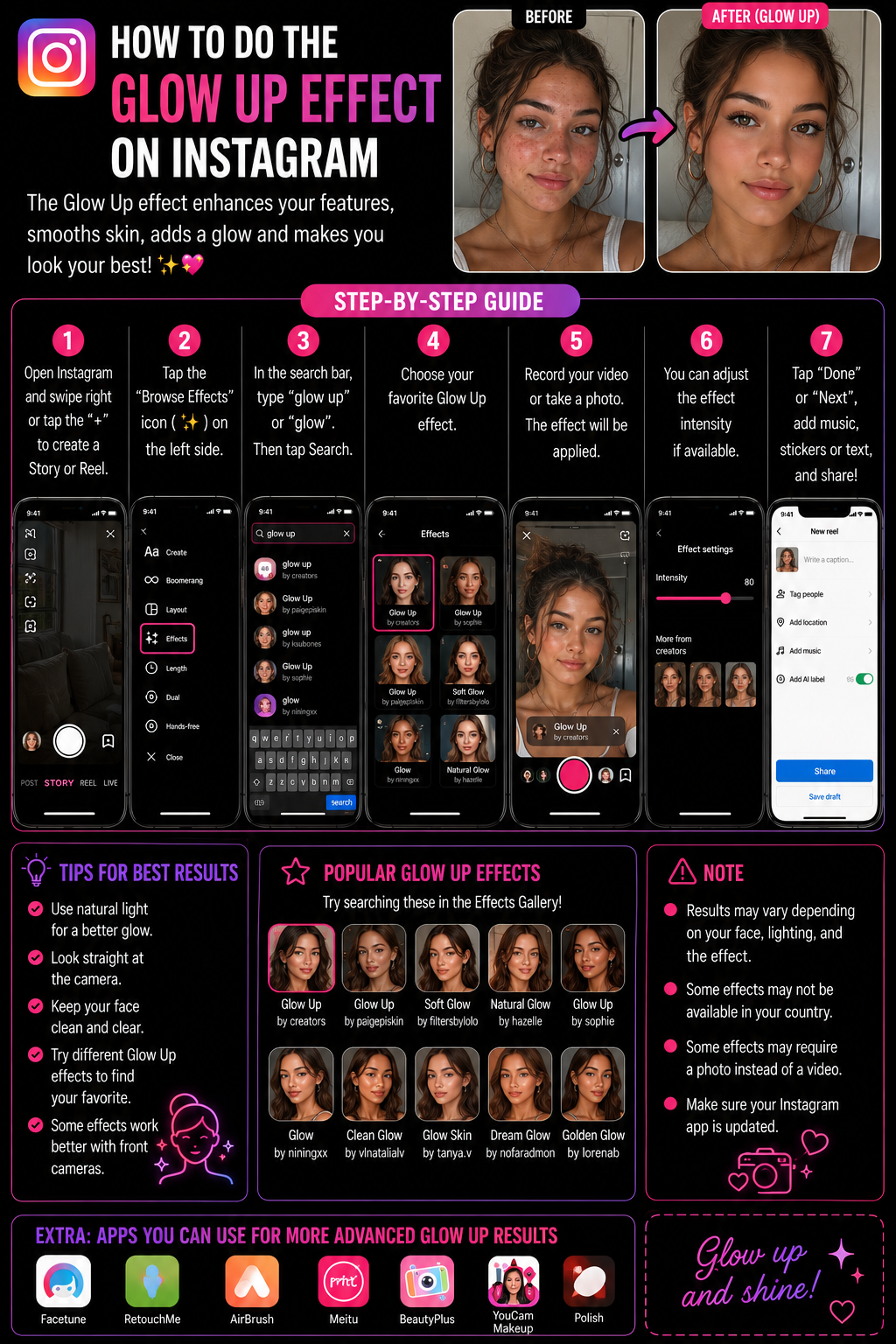
How to Do the Glow Up Effect on Instagram (Reels + Stories) ✨😄📸
The “Glow Up” effect on Instagram usually refers to a transformation-style filter or transition where you go from “before” to “after” with smoother skin, brighter lighting, and a more polished look, sometimes with sparkles, sometimes with a beauty layer, sometimes with a dramatic reveal timing. The reason people struggle is that “Glow Up” isn’t always one single official Instagram effect. It’s often a creator-made AR effect with a name like Glow Up, GlowUp, Glow Up Filter, Beauty Glow, Glow, or similar, and it can rotate, disappear, or be region-limited, so the best way to do it reliably is to (1) find and save the effect, or (2) copy the exact effect from a Reel that already uses it. Instagram’s Help Center confirms the core principle: you can add effects and filters before sharing content. Add effects and filters ✅
Definitions 🧠
Glow Up effect can be:
- AR beauty glow filter: live face smoothing, highlights, sparkles, warmer tone.
- Transition effect: timed reveal where you switch looks on a beat drop.
- Template trend: a Reel template that makes the before/after edit easy.
Effect Gallery is Instagram’s searchable library of effects you open by tapping Browse Effects in the camera effects tray.
Save effect bookmarks an effect so it stays in your tray, which is crucial for trends like Glow Up because names vary and search results change.
Why Important? 🎯✨
Glow Up content works because it compresses a story into a single visual moment: transformation. It’s the easiest “hook + payoff” structure on short-form video. Even a simple glow filter becomes powerful when paired with a clean transition and audio cue, because the viewer instantly understands what to expect and stays to see the reveal 😄.
Metaphor time: it’s like opening a curtain on a stage 🎭. The first half is behind-the-scenes, the second half is the show, and the audience loves the moment the curtain opens.
How to Apply ✅🛠️
Method 1: Use a Glow Up Effect from the Effect Gallery ✨
Stories 📸
1) Open Instagram → swipe right to open the Story camera.
2) Swipe the effects tray all the way to the end and tap Browse Effects (magnifying glass).
3) Search keywords like:
- glow up
- glow
- beauty glow
- soft glow
- sparkle
- beauty
- smooth
4) Preview effects and pick the one that matches your vibe.
5) Tap Save so it stays in your tray.
6) Record and post your Story.
Reels 🎬
1) Tap + → Reel.
2) Tap the Effects icon → Browse or search.
3) Use the same keywords and select the effect.
4) Record your before/after clip with the effect on, or record two clips and apply the effect to the “after.”
Instagram’s Help Center confirms you can add effects and filters before sharing content, which is the base workflow behind both Stories and Reels. Add effects and filters ✅
Method 2: Copy the Exact Glow Up Effect from Someone Else’s Reel 🔎💡
This is the fastest way to get the exact look, because Glow Up effect names vary:
1) Find a Reel using the Glow Up effect you like.
2) Tap the effect name shown on the Reel.
3) Tap Try it or Save effect.
4) Open your Reels camera and use the saved effect from your tray.
This method avoids the classic problem where you search “Glow Up” and get ten different effects that all look slightly different 😅.
Method 3: Do the Glow Up Transition (Before → After) on a Beat Drop 🎵✨
If you want the classic reveal, here is a clean approach that looks professional without complicated editing:
1) Choose your audio first, because timing matters.
2) In Reels, record clip 1 “before” (no effect or a minimal look). Keep your head position consistent.
3) Record clip 2 “after” (turn on Glow Up effect or add it to this clip), and match the pose and framing.
4) Cut the clips so the transition hits exactly on the beat drop or lyric cue.
5) Add a quick hand-cover or camera tap motion between clips if you want a smoother illusion.
The secret is not the filter. The secret is matching framing and timing. 😄
Make It Look Better ✨
1) Front lighting 💡 makes glow effects look cleaner and reduces harsh shadows.
2) Keep your camera angle consistent 📏 so the before/after feels like one scene.
3) Use a simple background 🧠 so the viewer focuses on the transformation.
4) Avoid stacking heavy smoothing because it can make skin look plastic. Choose a subtle glow effect.
5) Save your favorite effect so you can reuse it quickly and keep a consistent style.
If You Can’t Find Glow Up 🧯😵💫
1) Search broader terms like glow, beauty glow, soft glow, sparkle, smooth.
2) Update Instagram because effect discovery can break on older versions.
3) Restart the app if Effect Gallery looks empty.
4) Clear cache on Android or reinstall on iPhone if effects won’t load.
5) Use the effect from someone else’s Reel because that bypasses search and region issues.
Table 📊
| Goal | Best method | Best keywords | Pro tip |
|---|---|---|---|
| Simple glow beauty look | Effect Gallery search | glow, beauty glow | Save the effect |
| Exact trending Glow Up look | Save effect from a Reel | none | Copy the trend |
| Before/after transition on beat | Two clips in Reels editor | glow up + audio | Match framing and pose |
| Glow effect looks too strong | Choose a softer variant | soft glow | Reduce beauty stacking |
| Effect missing | Update + use from a Reel | sparkle, smooth | Search less, copy more |
Diagram 🧩
Open Reels or Stories camera
        |
        v
Browse Effects -> search "glow up" / "glow"
        |
        v
Preview -> save effect
        |
        v
Record before clip -> record after clip with glow
        |
        v
Cut on beat -> post ✅
Example 😄
You want a clean Glow Up Reel. You pick an audio with a beat drop at 4 seconds. You record clip 1 without the effect, looking straight into the camera. Then you switch to clip 2 with a Glow Up effect and a more polished look, same pose, same framing. You cut the clips so the switch hits exactly on the beat drop, add a small sparkle sticker, and post. It looks “professional” because the viewer feels the transition is intentional, not random.
Anecdote ☕😂
I’ve seen people blame the filter because their Glow Up looked messy, but the real issue was they changed camera angle and distance between clips, so the reveal felt like two unrelated videos. Once they matched framing and cut on the beat, even a simple soft glow filter looked amazing, which proves the transition timing is often more important than the filter itself 😅💛.
Personal Experience 🙂
If I want the exact Glow Up everyone uses, I don’t search. I find one Reel with the look I like, tap the effect name, save it, and use it. It saves time and guarantees consistency.
Conclusion ✅😄
To do the Glow Up effect on Instagram, use the Effect Gallery in Stories or Reels to search for Glow Up or related glow and beauty keywords, preview and save a filter you like, then record. For the classic before/after Glow Up trend, record two clips with consistent framing and cut the transition on the beat drop. If you want the exact trending version, save the effect directly from a Reel that already uses it. Instagram’s Help Center confirms effects and filters are added during creation, which is the core workflow behind all Glow Up effects. Add effects and filters ✅
10 Niche FAQs 🤓✅
1) Why can’t I find “Glow Up” by that exact name?
Effects are creator-made and names vary. Search glow, beauty glow, soft glow, sparkle.
2) How do I keep the effect forever?
Save it so it stays in your effects tray, unless the creator removes it later.
3) Why does my Glow Up effect look too plastic?
You may be stacking too much smoothing. Choose a softer glow variant.
4) Can I do Glow Up on Stories and Reels the same way?
Yes, both use Effects, but Reels gives you better clip timing control.
5) Why does the transition feel messy?
Framing mismatch. Keep camera distance and head position consistent between clips.
6) Do I need a specific audio?
No, but beat drops make the reveal feel intentional and satisfying.
7) Can I apply Glow Up after recording?
Sometimes you can apply effects while recording more easily. Post-edit effect control is limited.
8) Why do effects not load in my gallery?
App cache or version issue. Restart, update, clear cache, or reinstall.
9) Why does it look different on my friend’s phone?
Different effect variant, different camera processing, different lighting.
10) Where is the official guide for effects basics?
Instagram Help Center page on adding effects and filters. Add effects and filters
People Also Asked 🔎🙂
1) Is Glow Up effect the same as beauty filter?
Often it’s a beauty-style effect, but Glow Up trends also rely on transitions.
2) Why do Glow Up effects disappear?
Creators remove effects or they are taken down, so save early and keep alternatives.
3) Can I do Glow Up without a filter?
Yes. Makeup, lighting, and a clean transition can create a Glow Up even without an effect.
4) Can I use Glow Up with green screen?
Some effect stacking is limited. You may need to record separately or use editing tools.
5) What is the fastest method overall?
Save the exact effect from a Reel you like and reuse it from your tray.

